Token Mileage
A small desktop odometer that counts the tokens you use in Claude Code or Codex, shows which sessions are working, and how much of your plan is left. Free, open source, runs on your own computer.
Version 1.1.0 · Windows and Ubuntu (macOS works too) · By Alna
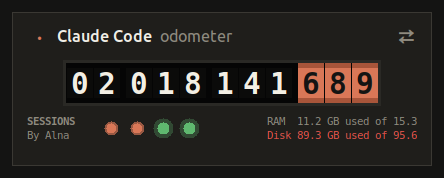
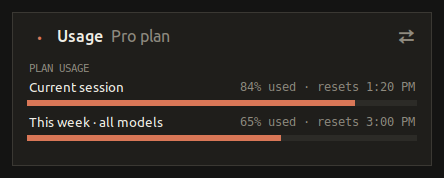
Claude Code Odometer
Tokens Claude Code used on this computer, live session dots, and your plan's session and weekly usage, like /usage.
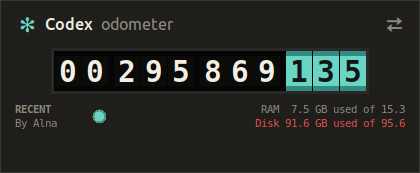
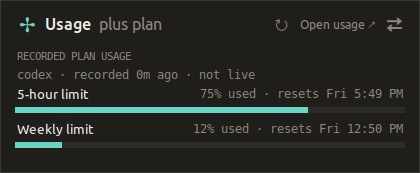
Codex Odometer
Tokens Codex used on this computer, recent sessions, and the last plan limits Codex recorded. It never reads your sign-in.
Download for CodexLet your AI install it
Copy a prompt and paste it into Claude Code, Codex or another coding assistant running on the computer. It downloads, checks and installs everything for you.
Claude Code Odometer
Install the Claude Code Odometer (Token Mileage) on this computer for me.

1. Download https://token-mileage.ebrahim-alnasser.com/downloads/token-mileage-claude.zip and unzip it into my home folder, so the files are in ~/token-mileage-claude (Windows: %USERPROFILE%\token-mileage-claude).
2. Find Python 3.9 or newer. On Windows use "py" (never "python3"). If Python or Tk is missing, tell me the exact command to install it and wait for me.
3. In that folder run "doctor.py" and fix anything marked fail. Give me any sudo command to run myself.
4. Run "install.py --launch" to add the desktop and menu shortcuts and open it. Ask me first if I want "--autostart" (start at login).
5. Run "install.py --status" and tell me where the shortcut is.

Do not change the "By Alna" credit or the LICENSE.
Codex Odometer
Install the Codex Odometer (Token Mileage) on this computer for me.

1. Download https://token-mileage.ebrahim-alnasser.com/downloads/token-mileage-codex.zip and unzip it into my home folder, so the files are in ~/token-mileage-codex (Windows: %USERPROFILE%\token-mileage-codex).
2. Find Python 3.9 or newer. On Windows use "py" (never "python3"). If Python or Tk is missing, tell me the exact command to install it and wait for me.
3. In that folder run "doctor.py" and fix anything marked fail. Give me any sudo command to run myself.
4. Run "install.py --launch" to add the desktop and menu shortcuts and open it. Ask me first if I want "--autostart" (start at login).
5. Run "install.py --status" and tell me where the shortcut is.

Do not change the "By Alna" credit or the LICENSE.
Install it yourself
One zip works on every system. You need Python 3.9 or newer.
- Install Python from python.org if you don't have it (keep "tcl/tk" ticked).
- Unzip the download, for example into
Documents. - Open the unzipped folder, click the address bar, type
cmdand press Enter. Then run:
py install.py --launch
This adds a desktop icon and a Start Menu entry. Add --autostart to start it when you log in.
- Make sure Tk is installed:
sudo apt install python3-tk - Unzip the download, for example into your home folder.
- In a terminal inside that folder run:
python3 install.py --launch
This adds a desktop icon and an app menu entry. Add --autostart to start it when you log in.
Updates
Once a day the odometer checks this site for a new version number. When there is one, the back of the card shows Update to …: click it and it updates itself and restarts. Your usage history is kept. You can also run install.py --update yourself.
The check only downloads a version number; it sends none of your usage. Turn it off with install.py --no-update-check.
Privacy
Token counts come from log files on your own computer and never leave it. The Claude meter asks Anthropic for your plan usage with Claude Code's own sign-in, the same as /usage. The Codex meter makes no requests about your account at all.